Systemd, Sleep and Caffeine
preface
If you were misled by the title to think this was some analysis of my broken sleep schedule and completely unrelated caffeine addiction, you can rest assured that this post has nothing to do with it. In recent times, the only technical things I play around with outside of work are my rice and this website, so I figured I should write about that. I’m going to try and see if I can finish this in one sitting, which will hopefully set the precedent for me to write these posts more frequently and for smaller topics. To all three of my loyal subscribers, apologies if the quality here has declined (what standards were you expecting, anyway?😞).
no sleep
I’m very cool and hip and don’t use a desktop environment. This means a bunch of things don’t work out of the box. Atleast I saved on the bloat, right?
The problem is this: I want my screen to dim after 20 minutes of inactivity. After 30 minutes, I want the system to sleep/suspend, and after a couple hours of that, hibernate if the charger isn’t plugged in. The former part of this works as expected with DPMS (Display Power Management Signaling) in Xorg, and the latter part works just as I want with systemctl suspend-then-hibernate (average systemd enjoyer). It’s the middle bit that’s been a thorn in my hindside. Relevant configuration stuff below if you’re interested.
$ cat /etc/X11/xorg.conf.d/10-monitor.conf
Section "Monitor"
   Identifier "monitor"
   Option "DPMS" "true"
EndSection

Section "ServerFlags"
    Option "StandbyTime" "20"
    Option "SuspendTime" "30"
    Option "OffTime" "20"
EndSection

$ cat /etc/systemd/sleep.conf
[Sleep]
AllowSuspendThenHibernate=yes
HibernateDelaySec=3h
Now, coming to handling suspend-on-idle. systemd-logind has the concept of IdleAction, which as per docs “configures the action to take when the system is idle”. Great, but how does systemd know when the system is idle? The answer is, it doesn’t. It relies on a desktop environment to keep track of this state. Ref this doc on writing desktop environments,
Whenever the session gets idle the DE should invoke the SetIdleHint(True) call on the respective session object on the session bus. This is necessary for the system to implement auto-suspend when all sessions are idle.
Aha! My hand-picked ultra-optimized no-bloat system does no such thing. For what it’s worth, there are standalone power managers packaged from various DEs that might be able to handle this for you. In case you’re wondering why the rest of this section exists, refer GIF above. For now, we can run the below command to set this hint manually and be happy about all the bloat we just avoided.
busctl --system call org.freedesktop.login1 /org/freedesktop/login1/session/self org.freedesktop.login1.Session SetIdleHint b true
Now that we’re one step closer, how do we know when the session is idle? Lucky for us, no hacks needed there. The X server keeps track of idle time already via XScreenSaver (I’ll leave you Wayland hipsters to figure this one out on your own). Per Xorg docs, the idle field specifies the number of milliseconds since the last input was received from the user on any of the input devices. Perfect! Now it’s just a matter of polling this, and that’s exactly what I did. See suspend-on-idle.sh, which I run as systemd service.
You’ll notice that I decided to forgo the IdleAction bits and just suspend the system directly. Mostly so I could choose to suspend or suspend-then-hibernate based on charge, and I didn’t really see much of a point in deferring this last step anyway. Another thing this script handles is idle timeouts before the X session begins. If I leave my machine at the login manager step, I don’t want it to stay awake waiting desperately for a login. I got around this by tracking time since boot in a file, and a lack of login after 20 minutes is treated as idle. After I wake it from suspend, I have about a minute till the next run of the service which will re-suspend it. Not perfect, but works well enough for me!
too much sleep
Now that my machine was no longer patrolling the night, I started waking up to a well-rested suspended system. Open up a long Youtube video for breakfast time and let it play. 30 minutes into the most interesting video essay of the week, there goes my system to sleep again. What’s happening? This was no time for an idle action. Well, think back to the earlier definition of idleness according to Xorg. It’s the time since the last input from the keyboard or the mouse. I could just bump up these timers to something that’s less plausible in daily use, but that’s too easy. We must find a way to expand our scope of idleness to exclude
- A video being played
- A Discord call that’s running in the background
- Large file downloads that need to keep the system awake
When in doubt, we ask: what do the DEs do? I couldn’t find a lot of documentation around this, but as with most things Linux, I believe there’s a few competing specs here, which mostly involves an inhibit signal to a D-Bus service. There’s also the FreeDesktop Idle Inhibition Service Draft that will hopefully unify some of this. Some apps might also just talk straight to systemd and ask it to inhibit suspend. Other apps just don’t even try!
There’s some discussion around this over at this blog post if you’re so inclined. I also found xssproxy which implements the org.freedesktop.ScreenSaver D-Bus service from the spec above. I don’t think this would cover all the cases I want (at least not at present) and personally, I’m happy with a hacky solution that works for me. There’s also caffeine-ng that sits in your systray and allows you to control when to inhibit. While I won’t be using the tool itself, I’ll gladly steal the terminology.
caffeine
At the risk of further outing myself as a systemd stan, I used systemd-inhibit for this. It’s essentially just a wrapper you can use while running a process, that inhibits suspend/hibernate/shutdown. Tie that into the window manager events, and it’s just a matter of managing the below process.
systemd-inhibit --who=awesome-widget sleep infinity
I wrote this Lua script for AwesomeWM, that keeps track of window signals and inhibits sleep as needed, with some handling to avoid duplicate processes. There’s also a widget that goes along with the script and indicates whenever the system is “caffeinated”. You can hover over the icon to see (spill the tea on) what triggered the action.
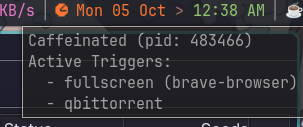
$ systemd-inhibit --what=sleep --mode=block
WHO            UID  USER    PID    COMM            WHAT  WHY                                  MODE
awesome-widget 1000 cliford 483466 systemd-inhibit sleep Detected fullscreen or caffeine apps block
This might need a bit more tuning, but it currently tracks
- Any of the entries in
AUTO_CAFFEINE_APPSspawning/closing. - Any window that gets maximized/unmaximized. This might not be a good blanket rule, but I pretty much only maximize videos, so it works for me.
- (not implemented yet) I already have a widget that tracks media playback. If the above two conditions don’t suffice, I’ll see if I can set up caffeination on media. But then again, I’d ideally want the system to suspend if I leave some music playing overnight.
conclusion
As I write this, I realize that the above comes across more like a guide than a blog post and I see the huge walls of text in there. I’ve been down this rabbit hole for a while now, and would love to hear about anything I’ve overlooked. I’ll see if I can keep this momentum going to write about some other stuff I’ve been doing (mostly around DDC/CI).
If you’re still here, I hope you’re at least a little more intrigued (or annoyed) about the fun world of Linux without a desktop environment. Maybe I’ve even convinced you to do the same. I’ve written at length about all the things I love about my setup, over at “On GNU/Linux and Ricing”. With that, I shall leave my system be, and hope that it goes to sleep.